Wake-on-LAN (WoL)
Table of Contents
Overview
The idea is to build a full AI-agent system, and this part is just a small piece to solve a larger problem. The problem I want to solve is running much of my LLM on my own machine, which has enough power to run some decent models (currently testing gemma4). The AI-agent itself should be able to compile and notify me every night, so I wake up to a summary. There are several systems I plan to fix up. But first and most importantly, my computer needs to be able to wake up e.g. during the night to run a script, and then shut down. Shutting down is not hard — that can be solved through software.
The problem is that I don't want to keep the computer on all the time, partly because it draws a lot of energy, and partly because it feels like unnecessary wear. So the idea is that it should be possible to start it remotely. By remote I mean it should be possible to connect to it and tell it to start — something I've actually been missing. So I have 2 proposals:
- WoL
- Wake-on-LAN
- Remote ESP32 wakeup
- using an ESP32 for power management
Let's start with the simplest, and perhaps slightly boring, WoL.
WOL - Wake-on-Lan
First we need to check if it's even possible to run WoL with this computer.
ip add | grep -v 'lo'|awk -e '/^[0-9]:/ {print $2}'
enp4s0:
br0:
Let's first sketch out how things are set up.
+----------------------+
|     Linux Host       |
|                      |
|   +--------------+   |
|   |    br0       |   |
|   | 192.168.x.x  |   |
|   +------+-------+   |
|          |           |
|   +------v-------+   |
|   |   enp4s0     |   |
|   |(Physical NIC)|   |
|   +--------------+   |
+----------|-----------+
           |
       Ethernet
           | 192.168.x.x
    +-------------+
    |   Router    |
    |             |
    +-------------+
           | <public-ip>
           |
     -------------
  --/             \--
 /     internet      \
(                     )
 \                   /
  --\             /--
     -------------
ethtool enp4s0 | grep Wake
Supports Wake-on: pumbg
Wake-on: d
Let's take a closer look at what this means.
wol p|u|m|b|a|g|s|f|d...
     Sets Wake-on-LAN options.  Not all devices support this.
     The argument to   this option is a  string of characters
     specifying which options to enable.

     nokeep;
     lB	l.
     p	Wake on PHY activity
     u	Wake on unicast messages
     m	Wake on multicast messages
     b	Wake on broadcast messages
     a	Wake on ARP
     g	Wake on MagicPacket\[tm]
     s	Enable SecureOn\[tm] password for MagicPacket\[tm]
     f	Wake on filter(s)
     d	T{
     Disable (wake on nothing).  This option clears all previous options.
     T}
- p
- Wake on PHY activity
- u
- Wake on unicast messages
- m
- Wake on multicast messages
- b
- Wake on broadcast messages
- g
- Wake on MagicPacket
The first 4 options pumb are probably not what I want — they mean e.g. the computer wakes up when a unicast message is detected on the network, or a broadcast, or when the physical cable is plugged in. None of those feel relevant. What I want is to be able to send a MagicPacket and have the computer start.
Fair enough. Let's enable WoL for the network card.
ethtool -s enp4s0 wol g
ethtool enp4s0 | awk '$1 == "Wake-on:" {print "Current state: " $2}'
Current state: d
If I reboot now, I'm afraid it will be the same result.
Let's test (Reboot🔁)
ethtool enp4s0 | awk '$1 == "Wake-on:" {print "Current state: " $2}'
Current state: d
Disabled — that was what I feared 😟 but we keep going. The problem is that WoL is not set in BIOS. This of course requires that the BIOS supports WoL — the first thing is to check which motherboard we're working with, and if there's support for it.
dmidecode -t baseboard | grep -E "Manufacturer|Product Name"
Manufacturer: ASUSTeK COMPUTER INC.
Product Name: PRIME X570-P
After some searching on the Asus website, it seems there is support but unfortunately not for extended security with extra bytes. Now the question is: how do you turn it on?
| Variable | Value | |
|---|---|---|
| BIOS | PCI-E/PCI | Enabled |
| BIOS | ErP Ready | Disabled |
- PCI-E/PCI
- Allows the computer to be started via the network card when it receives a magic packet.
- ErP ready
- Must be disabled — ErP is a power-saving standard; if enabled, power to the network card is cut in standby.
Let's test..
Current state: d
Still disabled, but now let's try setting it.. (reboot🔁)
Current state: d
Nope..😖! Let's check BIOS again just to be sure.
Ok, it seems like it automatically always sets it to this, or maybe some service is interfering?
So we need a systemd service that sets it to g. We also need to make sure: APM Configuration -> ErP Ready is disabled in BIOS.👍 (it is set)
Systemd service WOL
cat << EOF > /etc/systemd/system/wol@.service
[Unit]
Description=Wake-on-LAN for %i
After=network.target

[Service]
Type=oneshot
ExecStart=/usr/bin/ethtool -s %i wol g

[Install]
WantedBy=multi-user.target
EOF

sudo systemctl enable wol@enp4s0.service
sudo systemctl start wol@enp4s0.service
Created symlink '/etc/systemd/system/multi-user.target.wants/wol@enp4s0.service' → '/etc/systemd/system/wol@.service'.
systemctl status wol@enp4s0.service
Reboot 🫠….
Current state: d
Hmm.. Still disabled 😖
Ok after some research I've concluded that more systemd tweaks are needed.
cat << EOF > /etc/systemd/network/10-enp4s0.link
[Match]
MACAddress=xx:xx:xx:xx:xx:xx

[Link]
NamePolicy=keep kernel
WakeOnLan=magic
EOF
Now, let's reboot. Nope..😟
The link file is correct, but the problem seems to be that enp4s0 is
a bridge port to br0. What happens is that the r8169 driver resets
WoL settings when the link goes up/down.
From journal:
[10.715] enp4s0 renamed from eth0        -> udev applies .link -> WoL=g  OK
[10.902] enp4s0 entered promiscuous mode -> bridge takes over the port
[11.084] r8169 enp4s0: Link is Down      -> r8169 RESETS WoL -> d        BAD
[14.953] r8169 enp4s0: Link is Up - 1Gbps-> link back, but WoL stays d
Here is a clear picture of the sequence:
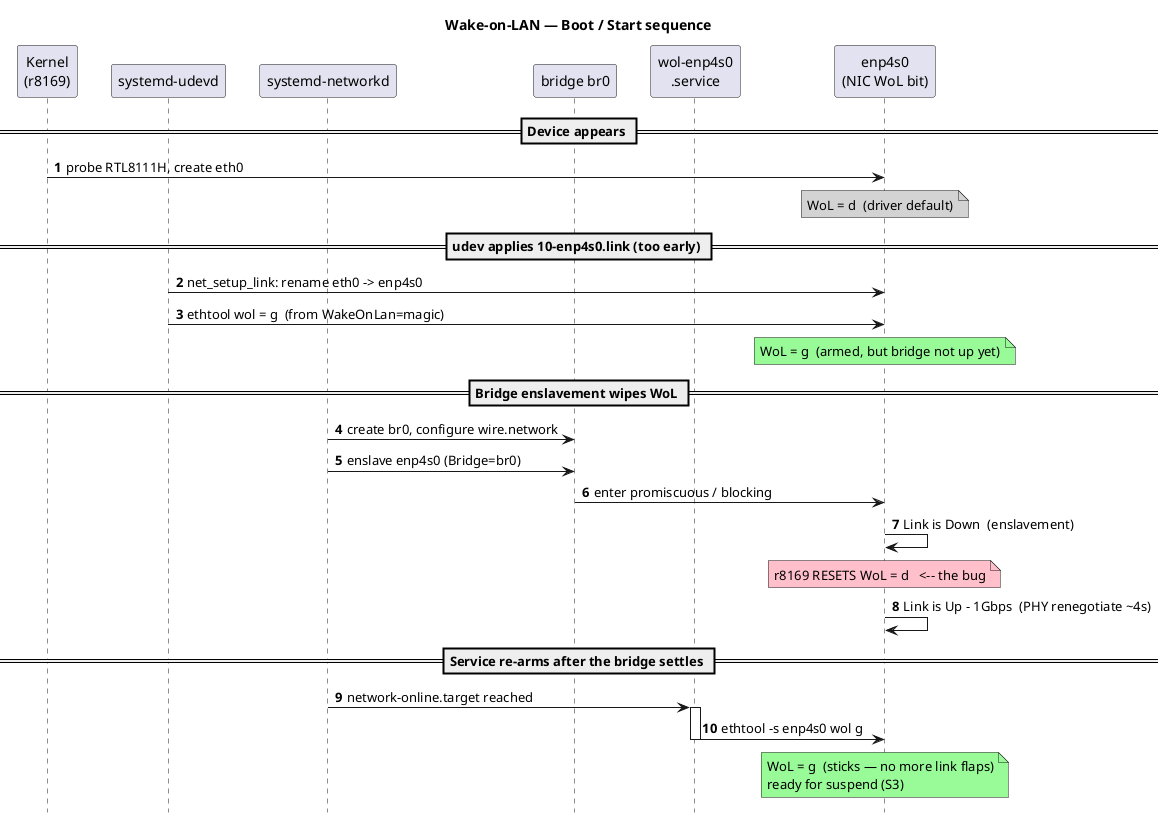
This explains the problem in both cases. Every time the .link file is
applied via udev, before the bridge resets the link, it gets set to
disabled. The solution here is to run it after network-online,
which should be safe since that's the last thing that happens when the
link is configured.
Hence the after:
Wants=network-online.target
After=network-online.target

[Service]
Type=oneshot
RemainAfterExit=yes
ExecStart=/usr/bin/ethtool -s enp4s0 wol g

[Install]
WantedBy=multi-user.target
The same applies unfortunately when the bridge is taken down too.
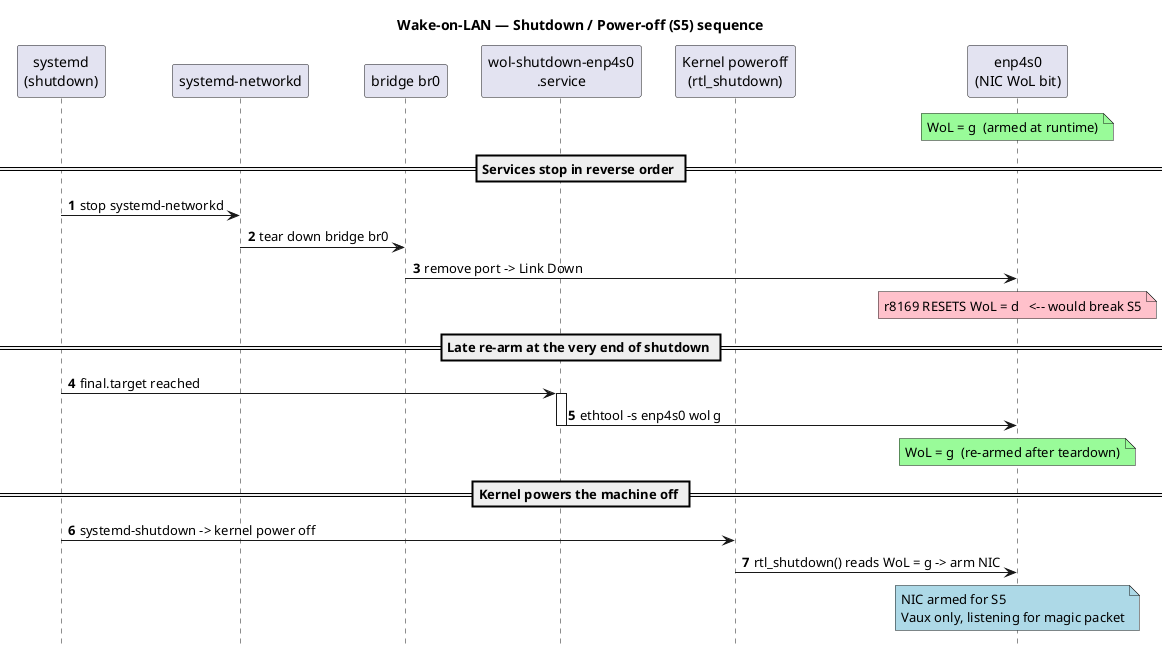
Because it resets when the link goes down, we had the same problem, but with an additional shutdown service (oneshot) we can re-arm it after the link is down.
[Unit]
Description=Re-arm Wake-on-LAN on enp4s0 before power off (S5)
# Runs at the very end of shutdown, after systemd-networkd has torn down
# bridge br0 (which clears WoL on the r8169), but before the kernel's
# poweroff path arms the NIC. This makes wake-from-power-off work.
DefaultDependencies=no
After=final.target

[Service]
Type=oneshot
ExecStart=-/usr/bin/ethtool -s enp4s0 wol g

[Install]
WantedBy=final.target
When the machine is powered off, the following applies:
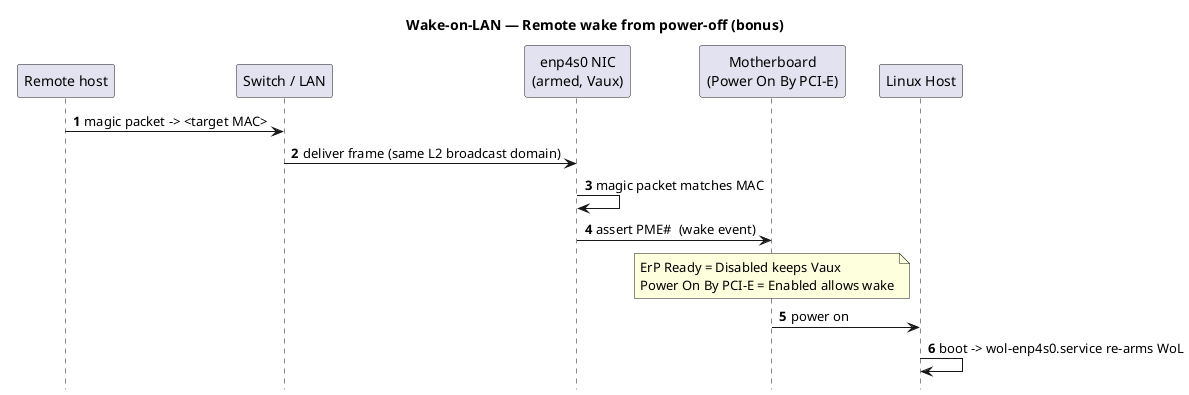
Final note
Not a big write-up, but if it can help anyone, then it served its purpose. But I guess these days most of this stuff is done by agents anyway, and to be honest I did use AI to give me the plantuml sequence diagrams (AI-LLM are awesome! But it sometimes takes the fun out of things🤨).